


Demystifying Birthday Queries and Reports
Most offices keep track of their client birthdays and run queries/ reports on a monthly basis. Some of you are wondering how to perform this task in Act4Advisors. It's EASY!
Performing the Birthday Query in Act4Advisors:
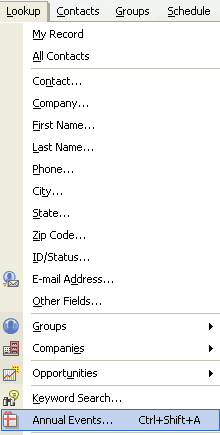
Go to Lookup on the menu in ACT! and choose Annual Events.
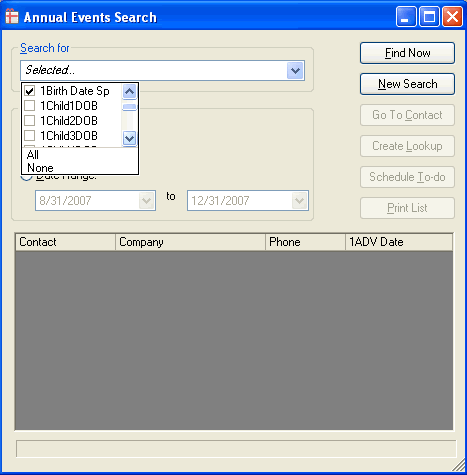
Click on the drop down menu and choose which fields you would like to query. For Birthdays, you may choose 1Birth Date Sp (Spouse), Birth Date (Contact), 1Child1DOB (Dependent 1), 1Child2DOB (Dependent 2), 1Child3DOB (Dependent 3), 1Child4DOB (Dependent 4), 1Child5DOB (Dependent 5), and 1Child6DOB (Dependent6).
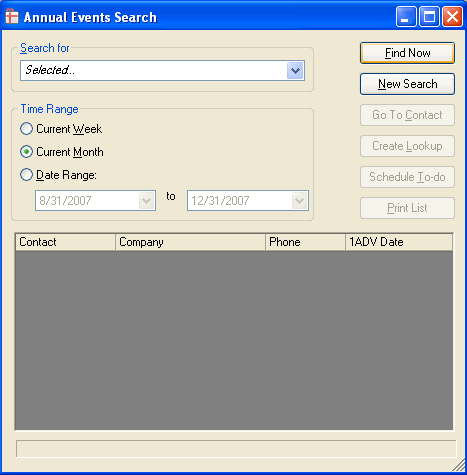
For the "Time Range" you have the choice of Current Week, Month, or Date Range. In this example, I chose "Current Month" and clicked on "Find Now".
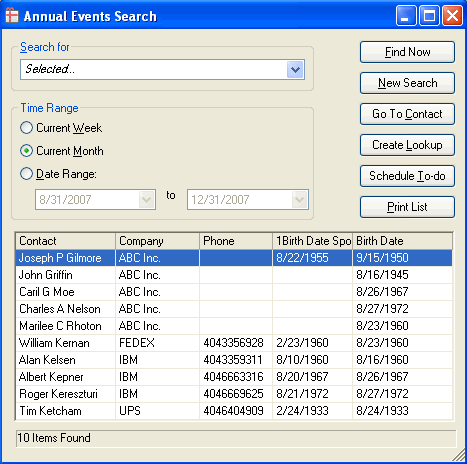
Several ways in running a Birthday Report in Act4Advisors:
Now that I have the Birthday Query and Report, what's next?
There are several things you can do. You may want to schedule reoccurring activities to be reminded every year to send a postcard, email, or call to wish your client a "Happy Birthday". You may take your current Lookup and perform a mail merge - printing labels, letters, and/or envelopes with the Preferred Mailing Addresses.
Send this email to a Friend >


